What AI Actually Is (And Why Most People Use It Wrong)
Lesson opener
In one line: The answer looks impressive - and is useless.
Why it matters: You ask an AI for help. The answer looks impressive - and is useless.
Before this lesson: PowerPoint capstone
You do not need any technical background for this course. If you can type a question, you can learn to prompt well.
This course has no prerequisites. Whether you just opened this site for the first time or you have completed every other course here, this skill makes you faster at all of them - Excel formulas, SQL queries, Python code, and more.
Before you start
| Resource | Link |
|---|---|
| Previous | PowerPoint capstone |
| Next | The anatomy of a good prompt |
Tools for this course: ChatGPT (chatgpt.com), Claude (claude.ai), or Gemini (gemini.google.com). All three have free plans, and the free plan is enough for every lesson here. Nothing in this course needs a paid subscription.
What you will learn
How AI language models work in plain English, why the same question gets different answers, and what "prompting" actually means.
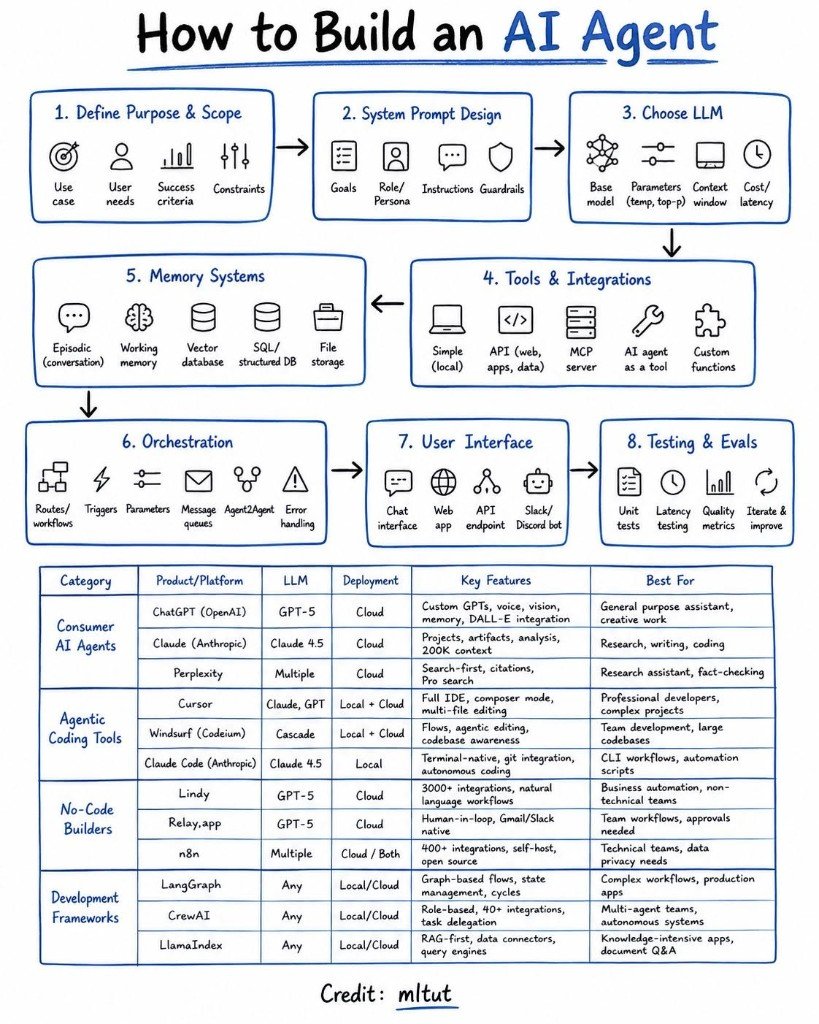
This course focuses on steps 1–2 (purpose and prompts). The full stack is here when you are ready to go deeper.
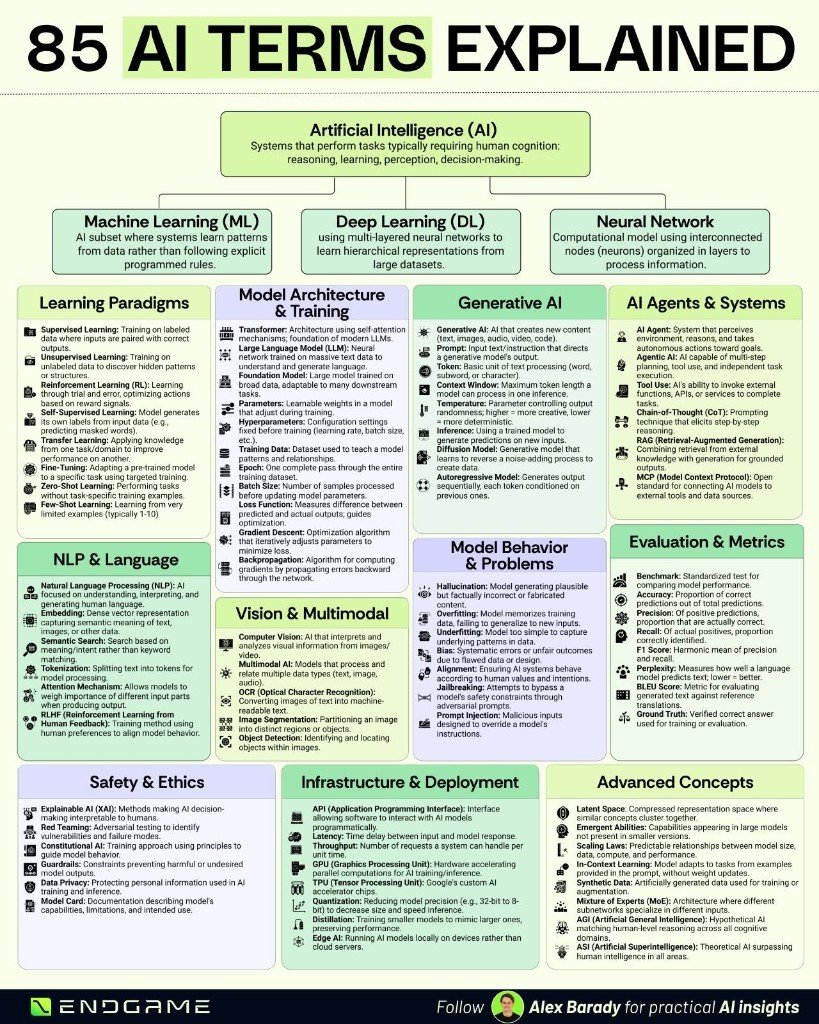
Bookmark this glossary — terms like LLM, token, RAG, and hallucination come up throughout the course and in real work.
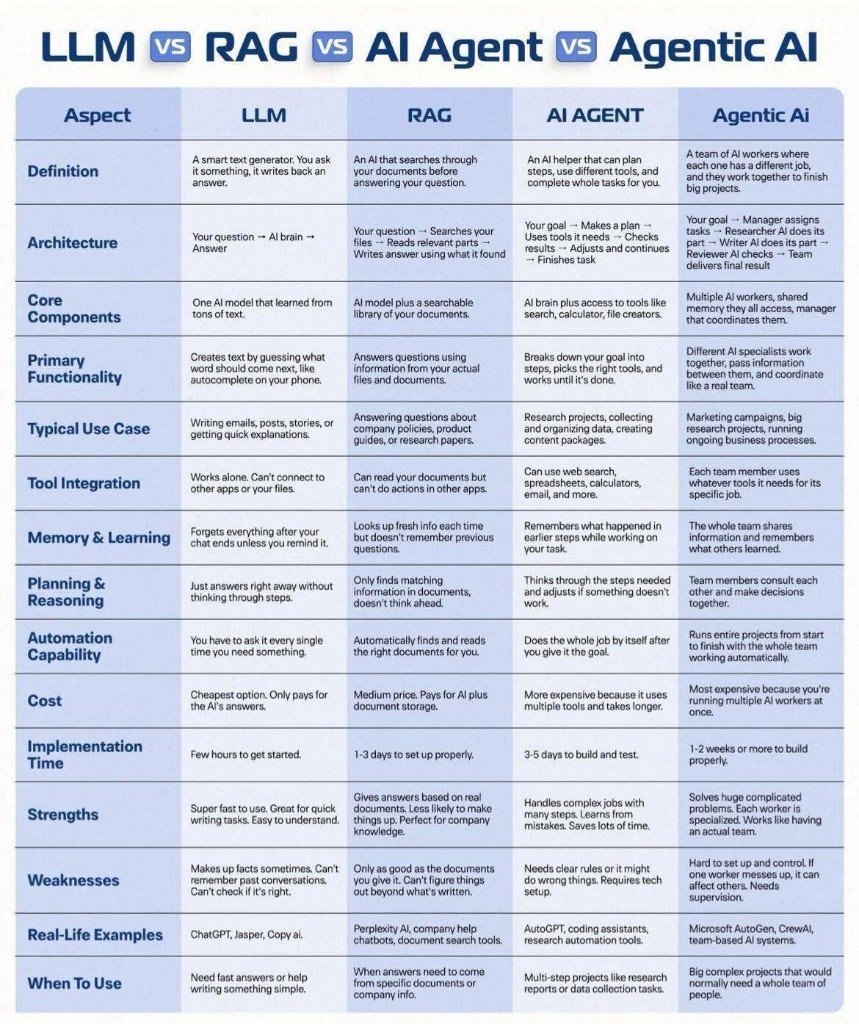
This course teaches you to prompt an LLM well. RAG and agents build on that — know the difference before you pick a tool.
The problem this course solves
You ask an AI for help. The answer looks impressive — and is useless.
Too generic, slightly wrong, or not what you asked for. So you decide AI is overhyped and go back to doing everything by hand.
The problem is usually not the AI. It is the question. This course fixes the question.
What is a language model — plain English
An AI language model is not a search engine. It does not look things up.
It predicts what a helpful, knowledgeable person would say next, based on patterns from billions of documents.
This means it can be confidently wrong. Knowing this changes how you use it.
In 22 years of IT, every new tool arrived with the same two crowds — people who dismissed it and people who trusted it blindly. Both were wrong about AI too. The people getting real value sit in the middle: they use it constantly and verify it constantly.
| A search engine… | A language model… |
|---|---|
| Finds documents that already exist | Generates new text word by word |
| Returns the same results for the same query | Can give different answers to the same question |
| Shows you sources | Has no idea where its "knowledge" came from |
| Cannot write your email | Writes your email in 5 seconds — sometimes with invented facts |
Why most people get bad results
Three reasons, each with a real example.
1. The question is too vague
Bad:
Help me with ExcelGood:
I have a column of dates in format DD-MM-YYYY in Excel.
I need to extract just the month as a number.
What formula does this?
The vague version forces the AI to guess what you want. The specific version gives it everything it needs to answer correctly the first time.
2. No context is given
Bad:
Write me an emailGood:
Write a professional email to a vendor who missed a delivery deadline.
Tone: firm but not aggressive.
I want a new delivery date confirmed in writing.
Without context, AI fills the gaps with averages — and average context produces average output.
3. The first answer is accepted without pushing back
AI gives a first answer. It is rarely its best answer.
These follow-ups almost always produce better output:
- "Can you improve that?"
- "Make it shorter"
- "Give me three alternatives"
The one rule that fixes 80% of bad prompts
Tell the AI who it is, what you need, and what format you want the answer in.
That's it. Everything else is refinement.
Act as [who it should be].
[What you need, with your real details.]
Answer as [the format you want].
Practice — free plan is enough
Never used an AI tool before? Open chatgpt.com or claude.ai, sign up free, and use this as your first prompt:
Help me write an Excel formulaNote how generic the answer is. That is your "before" picture. Now continue below.
Step 1: Write down a vague prompt — the one above, or any bad prompt you have typed this week.
Step 2: Rewrite it using the rule above — who the AI is, what you need, what format you want. Real details from your own work.
Step 3: Run both prompts and compare the outputs side by side.
Challenge (optional): Take the better answer and push back once — "What am I missing?" — and see what the AI adds.
Checklist
- [ ] Can you explain in one sentence why an AI model is not a search engine?
- [ ] Can you name the three reasons most prompts get bad results?
- [ ] Can you rewrite a vague prompt with who / what / format?
- [ ] Have you compared a vague prompt and a specific prompt on the same task?