Python Data Types
Lesson opener
In one line: Core scalar types: int, float, str, bool, None.
Why it matters: Each value has a type that determines what operations make sense on it.
Before this lesson: Variables
Before you start
What you will learn
- Core scalar types: int, float, str, bool, None
- Implicit vs explicit typecasting — why Python sometimes converts types without asking
- Every conversion function (
int,float,str,bool) with success and failure cases - Truthy and falsy — what
ifstatements actually check (includingbool([0])vsbool([])) - Common data-work bugs: string repetition,
TypeErrorfrom mixed types, and why blind conversion is risky (ValueErrorvsTypeError)
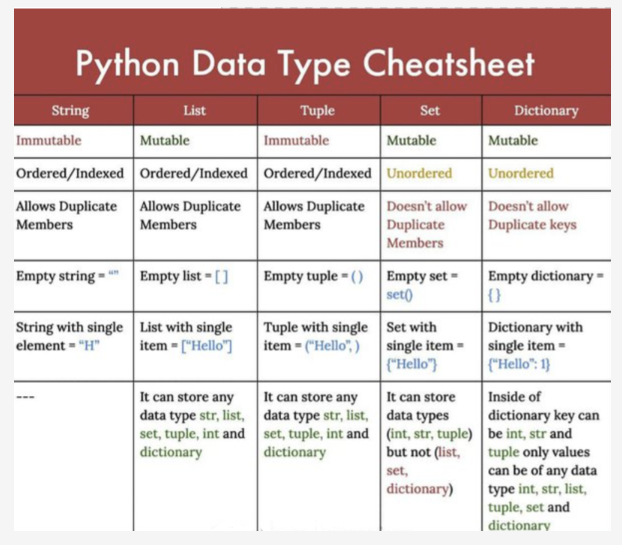
Built-in types
[Core scalar types]
WHY: Each value has a type that determines what operations make sense on it.
WHEN: You're storing mixed customer fields — counts, money, names, flags, and missing values.
n = 42          # int
price = 19.99   # float
name = "Rana"   # str
flag = True     # bool
missing = None  # NoneType
Breaking it down:
n = 42→ whole number (int)price = 19.99→ decimal number (float)name = "Rana"→ text string (str)flag = True→ yes/no booleanmissing = None→ explicit "no value" placeholder
Use this when: modeling a single customer record before building a DataFrame.
Section 1 — Implicit vs explicit typecasting
Plain English:
Python sometimes converts types for you without asking. That is implicit typecasting. You do it yourself with a function like int() or float() — that is explicit typecasting. Knowing the difference stops you from being confused by results you did not ask for.
Implicit examples
[Mixed arithmetic promotes int to float]
WHY: When you mix int and float, Python picks the wider type so nothing is lost.
WHEN: Any calculation mixing whole numbers and decimals.
# Python promotes int to float automatically in mixed arithmetic
result = 5 + 2.0
print(result)       # 7.0 — not 7
print(type(result)) # <class 'float'> — not int
Boolean arithmetic (surprises everyone)
print(True + 5)     # 6
print(False + 10)   # 10
print(True * 100)   # 100
# Why: True == 1, False == 0 in Python
# bool is a subclass of int — implicit promotion in math
Breaking it down:
5 + 2.0→ Python promotes5to5.0before adding → result isfloatTrue + 5→Trueacts as1→1 + 5 = 6- This is implicit — you never called
int(True)
Use this when: debugging why a calculation returned 7.0 instead of 7, or why True + 1 equals 2.
Section 2 — Explicit conversion: success and failure
[Inspect types with type()]
WHY: Before you convert, confirm what you actually have — especially from CSV or user input.
WHEN: A script crashes on row 47 and you need to see if the field is str or int.
type(42)          # <class 'int'>
type("42")        # <class 'str'>
int() — what works and what breaks
int(3.9)        # → 3 (truncates toward zero — NOT rounds)
int("42")       # → 42 (works)
int("3.14")     # → ValueError! (fails — decimal point in string)
int(True)       # → 1
int(False)      # → 0

# The fix for "3.14":
int(float("3.14"))  # → 3 (float first, then int)
Breaking it down:
int(3.9)→ truncates to3, does not round to4int("3.14")→ ValueError —int()cannot parse a decimal string directlyint(float("3.14"))→ parse as float, then truncate to int
float()
float(5)        # → 5.0
float("3.14")   # → 3.14 (works)
float("hello")  # → ValueError!
float(True)     # → 1.0
str() — almost never fails
str(42)         # → "42"
str(3.14)       # → "3.14"
str(True)       # → "True" (capital T — not "true")
str([1, 2, 3])  # → "[1, 2, 3]" (text representation of the list)
bool() — truthy and falsy
This is what if statements actually check.
bool(0)         # → False
bool(1)         # → True
bool(-99)       # → True (any non-zero number)
bool("")        # → False (empty string)
bool("hello")   # → True
bool([])        # → False (empty list)
bool([0])       # → True (list has one item — even though that item is 0)
bool(None)      # → False
The single most important rule for data filtering:
bool([0])is True because the list is not empty. Python checks whether the container has items, not whether the items inside are truthy. Empty[]is False; any non-empty list is True.
Use this when: filtering DataFrame rows, checking if user input exists, or validating API responses before processing.
Section 3 — Truthy and falsy table
| Value | bool() result | Why |
|---|---|---|
0 | False | Zero is falsy |
0.0 | False | Zero float too |
"" | False | Empty string |
[] | False | Empty list |
{} | False | Empty dict |
() | False | Empty tuple |
None | False | Nothing |
| Everything else | True | Non-zero numbers, non-empty strings, non-empty collections |
# Why this matters in real code:
user_input = ""

# Without knowing truthy/falsy:
if user_input == "":     # works but verbose
    print("No input")

# With truthy/falsy knowledge:
if not user_input:       # cleaner, Pythonic
    print("No input")

# Real data example:
data = []
if not data:
    print("No records to process")
Breaking it down:
if not user_input→ same asif user_input == ""for strings, but idiomatic Pythonif not data→ catches empty list, empty dict,None,0, and""in one check
Use this when: guard clauses at the top of a data pipeline — skip processing when there is nothing to work with.
Section 4 — Common mistake: type mismatch in operations
Plain English: This is the most common beginner bug in data work — values look like numbers but are still strings.
# TypeError — string minus integer:
age_str = "25"     # came from user input or CSV
birth_year = 2026 - age_str
# TypeError: unsupported operand type(s) for -: 'int' and 'str'

# Fix:
birth_year = 2026 - int(age_str)  # 2001
# String repetition — not multiplication:
price = "1500"
quantity = 3
total = price * quantity
print(total) # "150015001500" — string repeated 3 times!
# Fix:
total = int(price) * quantity # 4500| Code | What happens | Fix |
|---|---|---|
2026 - "25" | TypeError | 2026 - int("25") |
"1500" * 3 | "150015001500" | int("1500") * 3 |
int("3.14") | ValueError | int(float("3.14")) |
float("N/A") | ValueError | Check before casting |
Use this when: any field from input(), a CSV, or an API might still be text when you need math.
Section 5 — Safe conversion pattern
Never convert dirty data blindly. When a value might be "N/A", blank, or the wrong kind of object, a bare int() / float() can stop the whole script. Know what fails before you learn how to catch it.
# Clean values — explicit conversion is fine:
int("42")           # → 42
float("19.99")      # → 19.99
int(float("3.14"))  # → 3  (decimal string → float → int)

# Dirty / wrong values — these raise errors (do not run them yet):
# int("hello")      # ValueError — right kind of input for int(), bad content
# int("3.14")       # ValueError — decimal point is not allowed in int("...")
# float("N/A")      # ValueError — non-numeric content
# int(None)         # TypeError — wrong type entirely for this conversion
Breaking it down:
ValueError→ right type for the function, wrong content ("hello"or"N/A"toint/float)TypeError→ wrong type entirely (Nonetointin contexts that reject it)- Clean known strings → convert with
int()/float()(andint(float(...))when needed) - Dirty unknown strings → do not convert blindly; recover without crashing in Files & Exceptions (
try/except)
Use this when: deciding whether a CSV cell is safe to cast, or diagnosing why a conversion blew up.
Section 6 — eval() security warning
eval() can run any Python expression. That makes it a powerful typecaster — and a dangerous backdoor if fed user input.
# eval() executes ANY Python expression
# Never use eval() on user input in a real application:

# user_input = "__import__('os').system('rm -rf /')"
# eval(user_input)  # DANGEROUS — can run shell commands

# Safe alternatives:
age = int(input("Enter age: "))           # for numbers
# json.loads(input("Enter JSON: "))       # for data structures (import json)

# Only use eval() for:
# - Quick calculations in a notebook you control
# Never in: web apps, APIs, or any code accepting external input
Prefer
int(),float(),json.loads(), or your own parsers — noteval()on strings from people or files you do not trust.
From CSV row (concept)
[Casting string fields from a CSV row]
WHY: Exported spreadsheets store numbers as text — cast before comparisons or sums.
WHEN: You read a revenue cell as "914.35" and need it as a float for threshold checks.
revenue = float("914.35")
churned = int("0")
Breaking it down:
float("914.35")→ revenue string becomes a decimal numberint("0")→ churn flag string becomes integer 0
Use this when: parsing a single CSV row in a validation script.
Preview pandas dtypes in notebook:
[Checking column dtypes in pandas]
WHY: Pandas tracks types per column — preview before assuming everything is numeric.
WHEN: You loaded a CSV and want to spot columns stuck as object/string.
import pandas as pd
pd.read_csv("data/customers.csv").dtypes
Breaking it down:
import pandas as pd→ load pandaspd.read_csv(...)→ read the file into a DataFrame.dtypes→ Series showing each column name and its dtype
Use this when: first pass on a new dataset to plan type fixes.
Common type errors (quick reference)
Plain English: Python raises TypeError when you combine types that do not fit — like adding a string to a number without converting first.
revenue = "914.35"
# revenue + 100          # TypeError: can only concatenate str (not "int") to str

revenue_num = float(revenue)
total = revenue_num + 100 # works — 1014.35TypeError→ wrong type for the operation (str vs int)ValueError→ right type for the function, but the content cannot convert (e.g."N/A"to float)
Use this when: a script crashes on one bad row — print type(field) before you math it.
Essential commands
| Command / action | What it does |
|---|---|
type(x) | Return the type of a value. |
int(x) | Convert to integer — truncates floats; fails on "3.14" strings. |
float(x) | Convert to decimal — fails on non-numeric strings. |
str(x) | Convert to string — almost always succeeds. |
bool(x) | Truthy/falsy test — empty containers are False; bool([0]) is True. |
int(float("3.14")) | Safe path for decimal strings → int. |
None | Represents missing value in Python. |
.dtypes | Pandas column types on a DataFrame. |
Practice
Before you code, fill the three blanks — Input → Logic → Output (see the worked model in py1).
Do this now: Script demonstrating 4 types + 3 conversions; print types.
Input: ___
Logic: ___
Output: ___
# Input Data


# Logic


# Output
Checklist
- [ ]
type()used to inspect values before converting - [ ] Can you explain the difference between implicit and explicit typecasting?
- [ ] Can you explain why
int("3.14")fails butint(float("3.14"))works? - [ ] Can you list 4 values that
bool()converts toFalse? - [ ] Do you know what
True + 5returns and why? - [ ] Do you know why
bool([])isFalsebutbool([0])isTrue? - [ ] Can you fix
"1500" * 3and2026 - "25"type bugs? - [ ] Can you explain why blind conversion is risky, and name the two error types that can result?
- [ ] Read dtypes from CSV
- [ ] I can explain
TypeErrorvsValueErrorand fix a str+int mistake
Interview Prep — Skill Mastery Challenge
Before you attempt these questions:
- Review the lesson material above
- Try to answer verbally first — as if in a real interview
- Then reveal the answer
- Identify any gaps and re-read that section
Core built-in types include: int, float, str, bool, list, tuple, dict, set, and NoneType (None). You can check any value with type(x). These cover numbers, text, true/false, ordered collections, key-value maps, and unique-value sets.
💡 Interview tip: List them in groups: numbers (int, float), text (str), collections (list, tuple, dict, set), and None.
Mutable types (list, dict, set) can change in place after creation. Immutable types (int, float, str, bool, tuple, frozenset) cannot — any "change" creates a new object. Dict keys must be hashable, so they must be immutable: use a tuple as a key, never a list.
💡 Interview tip: Name examples both ways, then land the hashability angle — "list can't be a dict key because it isn't immutable."