Joins
Lesson opener
In one line: A join combines rows from two tables that share a key - INNER keeps matches only; LEFT keeps every row from the left table even when the right side is missing.
Why it matters: Customer details and sales live in separate tables; without a join you export twice and VLOOKUP in Excel.
Before this lesson: Aggregates
Before you start
| Resource | Link |
|---|---|
| Previous | Aggregates |
| Next | CASE statements |
What you will learn
INNER, LEFT, RIGHT joins — combine customers and sales.
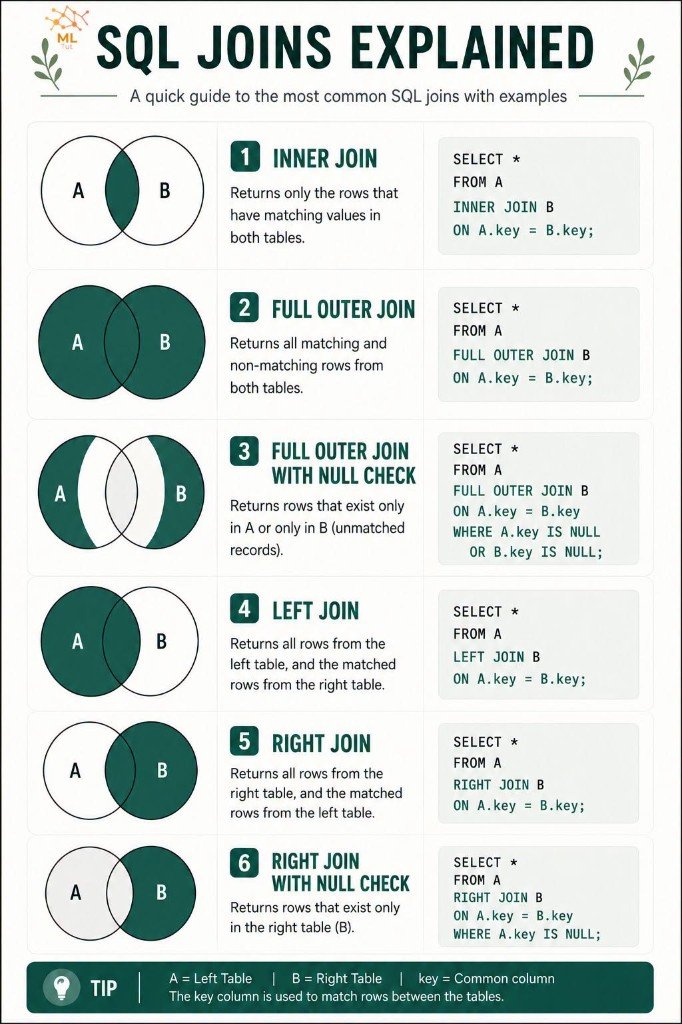
INNER JOIN
[Orders with customer details]
WHY: customers and sales live in separate tables — without a join you either guess customer segment per order or run two exports and VLOOKUP in Excel.
WHEN: You need each order line with the customer's segment for a channel performance report.
SELECT c.customer_id, c.segment, s.month, s.revenue
FROM customers c
INNER JOIN sales s ON c.customer_id = s.customer_id
LIMIT 20;
Breaking it down:
FROM customers c→ left table with aliascINNER JOIN sales s ON c.customer_id = s.customer_id→ keep only rows where ids match in both tablesSELECT c.customer_id, c.segment, s.month, s.revenue→ columns from both sides in one result
Use this when: You only care about customers who actually placed orders.
LEFT JOIN (all customers, even no sales)
[Every customer, including zero orders]
WHY: INNER JOIN silently drops customers with no sales — you miss churn risks and inactive accounts in your count.
WHEN: Retention team wants order count per customer, including people who never bought.
SELECT c.customer_id, c.segment, COUNT(s.order_id) AS orders
FROM customers c
LEFT JOIN sales s ON c.customer_id = s.customer_id
GROUP BY c.customer_id, c.segment;
Breaking it down:
LEFT JOIN sales s→ every customer row stays; sales columns are NULL when there's no matchCOUNT(s.order_id)→ counts matched orders; NULLs don't count — gives 0 for no salesGROUP BY c.customer_id, c.segment→ one row per customer after counting their orders
Use this when: Your metric is "all customers" and you need zeros, not just buyers.
Trap — WHERE on the right table turns LEFT into INNER
[LEFT JOIN + WHERE on right table]
WHY: WHERE runs after the join. Unmatched left rows have NULL in right-table columns, and NULL = 'mobile' is never true — so those “keep everyone” rows disappear silently. Your LEFT JOIN behaves like an INNER JOIN.
WHEN: You meant “all customers, with mobile sales attached when they exist,” but wrote a filter on sales in WHERE.
This course’s data has many customers with no sales rows (~100+). A LEFT JOIN is supposed to keep them. Watch what a right-side WHERE does on a small sketch of the same pattern:
-- Sketch: C has no sales. LEFT JOIN should keep C.
-- TRAP — WHERE filters sales.channel after the join → C disappears
SELECT c.customer_id, c.segment, s.channel, s.order_id
FROM customers c
LEFT JOIN sales s ON c.customer_id = s.customer_id
WHERE s.channel = 'mobile';| customer_id | What you wanted | What the trap returns |
|---|---|---|
| A (has mobile + web) | Keep; show mobile match | Kept (mobile row only) |
| B (has mobile) | Keep | Kept |
| C (no sales) | Keep, with NULL channel | Dropped — s.channel is NULL |
Fix 1 — put the right-table filter in ON: the join still keeps every customer; non-mobile (and missing) sales simply don’t match.
SELECT c.customer_id, c.segment, s.channel, s.order_id
FROM customers c
LEFT JOIN sales s
  ON c.customer_id = s.customer_id
 AND s.channel = 'mobile';
-- C stays, with NULL channel / order_id
Fix 2 — keep WHERE but allow NULLs explicitly when you still need unmatched left rows:
WHERE s.channel = 'mobile' OR s.channel IS NULL(Use Fix 1 when the filter describes which right rows to attach; use Fix 2 when you truly need “mobile matches or no match.”)
Filters on left-table columns in
WHERE(e.g.c.segment = 'Gold') are fine — those columns are never NULL’d by a LEFT JOIN fromcustomers. The silent INNER trap is filtering right-table columns after a LEFT JOIN.
RIGHT JOIN (all sales, even orphan rows)
[Every sales row, including unmatched customers]
WHY: RIGHT JOIN is the mirror of LEFT JOIN — it keeps every row from the right table. In practice, analysts often rewrite RIGHT JOIN as LEFT JOIN with tables swapped, but you should recognize it in interviews and legacy SQL.
WHEN: You start from the sales table and want every order line, even if the customer record is missing or corrupted.
SELECT s.order_id, s.revenue, c.segment
FROM customers c
RIGHT JOIN sales s ON c.customer_id = s.customer_id
ORDER BY s.order_id
LIMIT 20;
Breaking it down:
RIGHT JOIN sales s→ every sales row stays; customer columns are NULL when there's no match- Same result as
FROM sales s LEFT JOIN customers c— table order matters for LEFT vs RIGHT - Use when the business question starts from "all transactions" not "all customers"
Use this when: Auditing sales rows that fail to join to a customer master — data quality checks.
Self join (same table, twice)
Plain English: A self join connects a table to itself with two aliases — like matching employees to their managers when both live in the same employees table.
When to use it: You need each row paired with another row in the same table (manager ID → employee ID, or "find customers who share a referral code").
-- Each employee with their manager's name (manager_id points to another employee_id)
SELECT
  e.employee_id,
  e.name AS employee_name,
  m.name AS manager_name
FROM employees e
LEFT JOIN employees m ON e.manager_id = m.employee_id
LIMIT 20;
Breaking it down:
employees e→ the "child" rows (each employee)employees m→ the same table again, aliased asmfor the managere.manager_id = m.employee_id→ link each employee to their manager's rowLEFT JOIN→ keep employees even ifmanager_idis NULL (CEO has no manager)
Another example — duplicate referral detection:
SELECT a.customer_id, b.customer_id AS referred_friend
FROM customers a
INNER JOIN customers b ON a.referral_code = b.signup_referral
WHERE a.customer_id < b.customer_id;
Use this when: the relationship is inside one table, not between two different tables.
Join types — visual map
Plain English: Think of two tables as two circles of rows. The join type decides which rows survive when you overlap them.
| Join | Keeps |
|---|---|
| INNER | Matching rows only |
| LEFT | All left + matches |
| RIGHT | All right + matches |
Excel link
Same as XLOOKUP on Sales — SQL is repeatable and auditable.
Essential commands
| Command / action | What it does |
|---|---|
INNER JOIN ... ON | Rows with matches in both tables. |
LEFT JOIN ... ON | All rows from left table plus matches. |
Filter right cols in ON (not WHERE) | Keep LEFT semantics when restricting the right table. |
RIGHT JOIN ... ON | All rows from right table plus matches. |
Table alias (c, s) | Shorter SQL when joining multiple tables. |
Practice
Before each query, name the three SQL beats — Source → Pattern → Result (SQL translation of Input → Logic → Output — see sql2). For joins, name both tables in Source and whether the Result keeps unmatched rows.
Do this now:
INNER JOINcustomers to sales (worked model below).LEFT JOINwith order counts (include customers with zero sales).- Compare row counts: INNER vs LEFT — explain the difference in one sentence.
- Save
04_joins.sql.
Example framing for task 1:
-- Source: customers + sales (customer_id link)
-- Pattern: INNER JOIN … ON
-- Result: order lines with customer segment (only matched customers; sample of 20)

SELECT c.customer_id, c.segment, s.month, s.revenue
FROM customers c
INNER JOIN sales s ON c.customer_id = s.customer_id
LIMIT 20;
Framing prompts for the rest (fill these blanks in your .sql comments before writing each query):
- Source: ___
Pattern: ___
Result: ___
- Source: ___
Pattern: ___
Result: ___
Checklist
- [ ] INNER JOIN runs
- [ ] LEFT shows customers with zero orders
- [ ] I know why
WHEREon the right table after LEFT JOIN drops unmatched rows - [ ] RIGHT JOIN keeps all sales rows
- [ ] I can write a self join with two aliases on the same table
- [ ] I explain join choice
After joins: prove the same customer↔orders link in a short multi-tool brief — Cross-skill project brief (SQL path). Separate from the BA strategy capstone.