Sub-Queries
Lesson opener
In one line: What a subquery is (a SELECT inside another query).
Why it matters: Without seeing where a nested SELECT can sit, you treat every filter as a flat WHERE - and miss the "answer a small question first" pattern.
Before this lesson: Set operators
Before you start
| Resource | Link |
|---|---|
| Previous | Set operators |
| Next | CTE & Views |
| Lab data | /data/customers.csv, /data/sales.csv |
What you will learn
- What a subquery is (a
SELECTinside another query) - Subqueries in WHERE, FROM, and SELECT (scalar)
- Nested subqueries: subquery inside subquery inside subquery
- How to read nested SQL from the inside out
- When a subquery is better than a JOIN (and when to use a CTE instead)
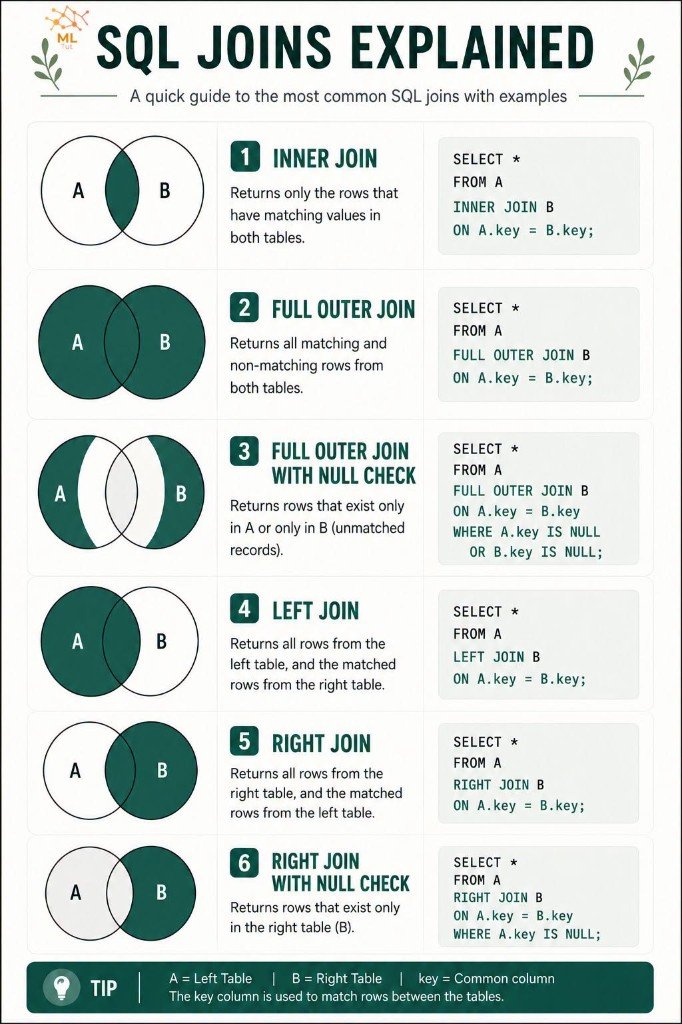
What is a subquery?
A subquery is a SELECT written inside another SQL statement. The outer query waits for the inner SELECT to finish, then uses its result.
[Subquery placement sketch]
WHY: Without seeing where a nested SELECT can sit, you treat every filter as a flat WHERE — and miss the "answer a small question first" pattern.
WHEN: You're reading someone else's SQL and need to spot inner vs outer query before debugging.
-- Outer query uses ( ... inner SELECT ... )
SELECT ...
FROM ...
WHERE column > ( SELECT ... );   -- subquery in WHERE
Breaking it down:
SELECT ... FROM ...→ the outer (big) question( SELECT ... )inWHERE→ inner query runs first; its result feeds the filtercolumn > (...)→ compare each row to one value from the inner query
Use this when: You're mapping where subqueries can live before writing your first real one.
Think of it as: Ask a small question first, then use the answer in the big question.
Types of subquery results
| Type | Inner query returns | Used with | Example |
|---|---|---|---|
| Scalar | One value (one row, one column) | =, >, < | (SELECT AVG(revenue) FROM sales) |
| Single-row | One row, many columns | = (SELECT a, b ...) (less common) | Rare in beginners |
| Table | Many rows | IN, NOT IN, FROM (...) | (SELECT customer_id FROM sales) |
Rule: A scalar subquery must return exactly one value. If it might return many rows, use IN or put it in FROM.
Level 1 — Subquery in WHERE (scalar)
Question: Which customers earn more than the average revenue?
[Above-average revenue customers]
WHY: The average isn't in any column — you either export everything to Excel or compute it inline and filter in one pass.
WHEN: Sales wants "customers beating company average" for a VIP outreach list.
SELECT customer_id, segment, total_revenue
FROM customers
WHERE total_revenue > (
  SELECT AVG(total_revenue) FROM customers
);
Breaking it down:
- Inner
( SELECT AVG(total_revenue) FROM customers )→ one number — company-wide average - Outer
WHERE total_revenue > (...)→ keep rows strictly above that number
Use this when: Your threshold is dynamic (average, max, latest month total) not a fixed constant.
Inside-out:
- Inner:
SELECT AVG(total_revenue)→ one number, e.g.850 - Outer: keep rows where
total_revenue > 850
Level 1 — Subquery in WHERE with IN (table)
Question: Which customers placed at least one mobile order?
[Customers with mobile orders]
WHY: You could join and DISTINCT, but sometimes a list of ids from sales is clearer — "is this id in the mobile buyer set?"
WHEN: Product asks who ever ordered via the mobile app, regardless of how many times.
SELECT customer_id, segment, total_revenue
FROM customers
WHERE customer_id IN (
  SELECT DISTINCT customer_id
  FROM sales
  WHERE channel = 'mobile'
);
Breaking it down:
- Inner query → list of customer_ids that have at least one mobile sale
WHERE customer_id IN (...)→ keep customers whose id appears in that list
Use this when: You're filtering the parent table by membership in a set from another table.
Inside-out:
- Inner: list of
customer_idvalues from mobile sales - Outer: keep customers whose id appears in that list
Level 2 — Subquery inside subquery (WHERE → WHERE)
Question: Which customers ordered in months where at least one order was above the overall average order revenue?
[Customers active in "big order" months]
WHY: The logic chains three ideas — average order size, which months had a big order, which customers ordered then — too messy as one flat filter.
WHEN: You're studying seasonal spikes and want customers who showed up in months when someone placed an unusually large order.
SELECT customer_id, segment, total_revenue
FROM customers
WHERE customer_id IN (                    -- ② middle: customers in those months
  SELECT DISTINCT customer_id
  FROM sales
  WHERE month IN (                        -- ① inner: which months qualify?
    SELECT DISTINCT month
    FROM sales
    WHERE revenue > (
      SELECT AVG(revenue) FROM sales      -- ⓪ deepest: one average value
    )
  )
);
Breaking it down:
- ⓪
SELECT AVG(revenue)→ single benchmark order size - ①
month IN (SELECT DISTINCT month ... WHERE revenue > avg)→ months with at least one order above benchmark - ②
customer_id IN (SELECT ... WHERE month IN ...)→ buyers active in those months - Outer
SELECT ... FROM customers→ profile rows for those ids
Use this when: Your filter depends on an aggregate from a child table, then membership, then parent details.
Read from the inside out (⓪ → ① → ② → outer):
| Step | Query part | Meaning |
|---|---|---|
| ⓪ | SELECT AVG(revenue) FROM sales | One number: typical order size |
| ① | month IN (SELECT DISTINCT month ... WHERE revenue > avg) | Months that had a "big" order |
| ② | customer_id IN (SELECT ... FROM sales WHERE month IN ...) | Customers who ordered in those months |
| Outer | SELECT ... FROM customers WHERE ... | Customer details |
Same logic in English:
Average order → find "strong" months → find customers active in those months → show customer profile.
Level 3 — Subquery in subquery in subquery (three levels in WHERE)
Question: Customers in segments whose average customer revenue beats the company-wide average, who also ordered in "strong" months (from above).
This adds a third inner filter on segment:
[High-performing segments in hot months]
WHY: Stacking segment quality and month quality in one WHERE avoids exporting three intermediate lists to merge in Excel.
WHEN: Strategy wants customers from segments that outperform company average, who also bought during standout revenue months.
SELECT customer_id, segment, total_revenue
FROM customers
WHERE segment IN (                        -- ③ segment gate
  SELECT segment
  FROM customers
  GROUP BY segment
  HAVING AVG(total_revenue) > (
    SELECT AVG(total_revenue) FROM customers   -- ⓪ company average
  )
)
AND customer_id IN (                      -- ② customers in hot months
  SELECT DISTINCT customer_id
  FROM sales
  WHERE month IN (                        -- ① hot months
    SELECT DISTINCT month
    FROM sales
    WHERE revenue > (
      SELECT AVG(revenue) FROM sales      -- ⓪ order average (reused idea)
    )
  )
);
Breaking it down:
segment IN (...)branch → only segments whose average customer revenue beats company averagecustomer_id IN (...)branch → same hot-month logic as Level 2AND→ customer must pass both gates
Use this when: Two independent nested filters must both be true — segment-level and activity-level.
Inside-out for the segment IN (...) branch:
- ⓪ Company-wide
AVG(total_revenue)fromcustomers - ③ Segments whose own average customer revenue beats that number
- Outer
WHERE segment IN (...)keeps only segments that pass that average test (whatever their names are)
Inside-out for the customer_id IN (...) branch: same as the Level 2 example (⓪ → ① → ②).
Study tip: Draw a box around each
( SELECT ... )and label it ⓪, ①, ②. Run each inner query alone in MySQL Workbench to see its result before running the full query.
Level 2 — Nested subqueries in FROM (derived tables)
Question: Average per-customer monthly revenue, then average by segment.
Step A — inner: revenue per customer per month
Step B — middle: total per customer
Step C — outer: average by segment
[Three-layer derived table rollup]
WHY: One GROUP BY can't jump from order lines → customer → segment in a single step without losing the grain you need at each stage.
WHEN: You're building segment average of per-customer lifetime sales from monthly order detail.
SELECT segment, AVG(customer_total) AS avg_customer_revenue
FROM (
  SELECT customer_id, segment, SUM(month_rev) AS customer_total
  FROM (
    SELECT
      c.customer_id,
      c.segment,
      s.month,
      SUM(s.revenue) AS month_rev
    FROM customers c
    INNER JOIN sales s ON c.customer_id = s.customer_id
    GROUP BY c.customer_id, c.segment, s.month
  ) AS per_month
  GROUP BY customer_id, segment
) AS per_customer
GROUP BY segment;
Breaking it down:
- Innermost
per_month→ revenue per customer per month - Middle
per_customer→ sum months into one total per customer - Outer → average those customer totals by segment
AS per_month,AS per_customer→ required names for each subquery in FROM
Use this when: Each aggregation step needs its own grain before the next rollup.
Aliases are required: Every FROM (SELECT ...) must have a name (AS per_month, AS per_customer).
Inside-out:
| Layer | Alias | Produces |
|---|---|---|
| Innermost | per_month | One row per customer per month |
| Middle | per_customer | One row per customer (sum of months) |
| Outer | — | One row per segment |
Level 3 — Three derived tables in FROM
Question: For each segment, show average order revenue for orders that are above that segment's own average order size.
[Above-segment-average orders by segment]
WHY: Company-wide average order size treats Platinum like Bronze — segment-specific benchmarks need the inner query to "see" each row's segment.
WHEN: Category managers want average size of only their large deals, compared to their segment norm.
SELECT segment, AVG(revenue) AS avg_big_order_revenue
FROM (
  SELECT c.segment, s.revenue
  FROM sales s
  INNER JOIN customers c ON s.customer_id = c.customer_id
  WHERE s.revenue > (
    SELECT AVG(s2.revenue)
    FROM sales s2
    INNER JOIN customers c2 ON s2.customer_id = c2.customer_id
    WHERE c2.segment = c.segment          -- correlated: "this row's segment"
  )
) AS big_orders
GROUP BY segment;
Breaking it down:
- Correlated inner query → segment average for the current outer row's segment
- Middle layer → only orders above that segment's average
- Outer →
AVG(revenue)of those big orders per segment
Use this when: The benchmark varies per row (correlated subquery) — advanced but common in tiered reporting.
Here the innermost subquery is correlated (it references c.segment from the outer row). That is an advanced pattern; the nesting idea is the same — inner runs in context of the middle query.
Simpler non-correlated 3-level FROM (practice):
[Progressive revenue filters by channel]
WHY: Sometimes you just want to stack filters — over 50, then over 100 — and see average by channel at the end, without correlated logic.
WHEN: You're practicing nested FROM layers before tackling correlated benchmarks.
SELECT channel, AVG(revenue) AS avg_rev
FROM (
  SELECT channel, revenue
  FROM (
    SELECT channel, revenue, month
    FROM sales
    WHERE revenue > 50
  ) AS filtered
  WHERE revenue > 100
) AS double_filtered
GROUP BY channel;
Breaking it down:
- Inner
filtered→ orders above $50 - Middle
double_filtered→ from those, keep above $100 - Outer → average remaining revenue by channel
Use this when: You're learning to run SELECT * FROM (...) at each layer and watch row counts shrink.
⓪ Inner: orders over 50
① Middle: from those, keep over 100
② Outer: average by channel
Run each level separately with SELECT * FROM (...) to see row counts drop.
Scalar subquery in SELECT list
Question: Show each customer's revenue and how far they are above the average.
[Distance above company average]
WHY: Showing raw revenue doesn't tell you "how much better than typical" — subtracting the average in-line gives a comparable score.
WHEN: You're ranking top 10 customers by how far they sit above mean revenue for a leaderboard.
SELECT
  customer_id,
  segment,
  total_revenue,
  total_revenue - (SELECT AVG(total_revenue) FROM customers) AS above_avg
FROM customers
ORDER BY above_avg DESC
LIMIT 10;
Breaking it down:
(SELECT AVG(total_revenue) FROM customers)→ same scalar repeated for every rowtotal_revenue - (...)→ dollars (or units) above company averageORDER BY above_avg DESC LIMIT 10→ biggest outperformers first
Use this when: You want a derived column per row based on a whole-table statistic.
One scalar subquery in the SELECT list — must return a single value.
EXISTS (optional, powerful)
Question: Customers who have at least one sale (similar to IN, often faster on large data).
[Customers with any sale — EXISTS]
WHY: IN with a huge id list can get heavy — EXISTS stops at the first matching sale row and answers yes/no per customer.
WHEN: You only need a boolean "has ordered?" filter, not the list of order ids.
SELECT c.customer_id, c.segment
FROM customers c
WHERE EXISTS (
  SELECT 1
  FROM sales s
  WHERE s.customer_id = c.customer_id
);
Breaking it down:
EXISTS ( SELECT 1 FROM sales s WHERE s.customer_id = c.customer_id )→ true if any sale row matches this customerSELECT 1→ placeholder; EXISTS only cares if a row was found- Outer keeps customers where EXISTS is true
Use this when: Large sales table, simple "has at least one child row" check — often faster than IN.
EXISTS returns true/false — it does not return a list of ids. Good when you only need "yes/no".
Correlated subquery (intro)
The inner query depends on the current row of the outer query.
[Above segment average, not company average]
WHY: Company average makes a Bronze customer look bad and Platinum look good unfairly — compare each row to its own segment's peers.
WHEN: Segment leads want "top performers within Gold" not "top performers company-wide."
SELECT c.customer_id, c.segment, c.total_revenue
FROM customers c
WHERE c.total_revenue > (
  SELECT AVG(c2.total_revenue)
  FROM customers c2
  WHERE c2.segment = c.segment    -- tied to outer row
);
Breaking it down:
- Inner
WHERE c2.segment = c.segment→ average only customers in the same segment as the outer row - Outer
c.total_revenue > (...)→ beat your segment's average, not everyone's
Use this when: Benchmarks should be peer-group relative (segment, region, cohort).
Meaning: Compare each customer to the average of their own segment, not the whole company.
Nested correlated subqueries are hard to read — prefer CTE & Views when you go beyond two levels.
Subquery vs JOIN vs CTE
| Situation | Often best |
|---|---|
| Filter by a list from another table | IN (SELECT ...) or JOIN |
| Filter by one calculated number | WHERE x > (SELECT AVG...) |
| Many nested layers for one report | WITH (CTE) or a VIEW |
| Reuse same logic every day | VIEW |
JOIN version of IN example:
[Mobile buyers via JOIN]
WHY: Same result as IN (SELECT ...) — teams differ on which reads clearer; knowing both avoids rewrites in code review.
WHEN: Your style guide prefers joins over subqueries for "customers with mobile orders."
SELECT DISTINCT c.customer_id, c.segment, c.total_revenue
FROM customers c
INNER JOIN sales s ON c.customer_id = s.customer_id
WHERE s.channel = 'mobile';
Breaking it down:
INNER JOIN sales→ attach orders to customersWHERE s.channel = 'mobile'→ mobile orders onlyDISTINCT→ one row per customer if they have many mobile orders
Use this when: You want the IN-filter result but your team standardizes on explicit joins.
Same result as WHERE customer_id IN (SELECT ...). Pick whichever is clearer to you and your team.
Common mistakes
| Mistake | Fix |
|---|---|
| Scalar subquery returns 2+ rows | Use IN or LIMIT 1, or aggregate with AVG/MAX |
Forgot alias on FROM (SELECT ...) | Always: FROM (...) AS alias |
NOT IN with NULLs in inner list | NULLs make NOT IN behave oddly — use NOT EXISTS or filter WHERE col IS NOT NULL |
| Too many nested levels | Rewrite with CTE: WITH step1 AS (...), step2 AS (...) |
| Inner query runs "too many times" | Correlated subqueries can be slow — try JOIN or CTE |
How to debug nested subqueries
- Run the deepest subquery alone — check row count and sample values.
- Wrap it in the next level — run
SELECT * FROM (...)with alias. - Add one outer layer at a time until the full query works.
- Comment layers in your
.sqlfile:
[Layer labels in comments]
WHY: A 3-level nest without labels means you lose track of which parenthesis is ⓪ vs ② when something breaks.
WHEN: You're saving the hot-months nested query and want to uncomment layers one at a time while debugging.
-- ⓪ SELECT AVG(revenue) FROM sales;
-- ① SELECT DISTINCT month FROM sales WHERE revenue > ( ... ⓪ ... );
Breaking it down:
-- ⓪ ...→ commented deepest query — run alone first-- ① ...→ next layer up — uncomment when ⓪ looks right
Use this when: You're stepping through nested SQL in Workbench and need a paper trail in the file.
Essential commands
| Command / action | What it does |
|---|---|
WHERE col > (SELECT AVG...) | Scalar subquery — compare to one value. |
WHERE col IN (SELECT ...) | Match any value from subquery list. |
WHERE col IN (SELECT ... IN (SELECT ...)) | Nested subqueries in WHERE. |
FROM (SELECT ...) alias | Derived table — subquery in FROM. |
WHERE EXISTS (SELECT 1 FROM ... WHERE ...) | True if inner query finds rows. |
SELECT col, (SELECT AVG...) AS x | Scalar subquery in SELECT list. |
Practice
Before each query, name the three SQL beats — Source → Pattern → Result (SQL translation of Input → Logic → Output — see sql2). Nested queries still use the same habit: name the inner Source/Pattern/Result first, then the outer.
Do this now:
- Run the scalar
AVG(total_revenue)example alone, then full query. - Run the 2-level
month IN (...)example; execute ⓪ and ① separately first. - Run the 3-level
segment IN+customer_id INexample; label each subquery on paper. - Build the 2-level FROM derived table;
SELECT *from each layer. - Rewrite one nested WHERE query as a JOIN and compare results.
- Save everything as
08_subquery.sql.
Example framing for task 1 (scalar subquery):
-- Source: customers (total_revenue) — inner asks for one number; outer uses all rows
-- Pattern: scalar subquery in WHERE (compare each row to AVG)
-- Result: customers whose revenue is above the overall average (one row per customer)

SELECT customer_id, segment, total_revenue
FROM customers
WHERE total_revenue > (
  SELECT AVG(total_revenue) FROM customers
);
Framing prompts for the harder tasks (put blank comments in 08_subquery.sql and fill them before each query):
- Source: ___
Pattern: ___
Result: ___
- Source: ___
Pattern: ___
Result: ___
- Source: ___
Pattern: ___
Result: ___
- Source: ___
Pattern: ___
Result: ___
Checklist
- [ ] I can explain what a subquery is
- [ ] I used a scalar subquery in
WHERE - [ ] I used
IN (SELECT ...) - [ ] I ran a subquery inside a subquery (2 levels) and read it inside-out
- [ ] I tried a 3-level nested example (WHERE or FROM)
- [ ] I used
FROM (SELECT ...) aliaswith a required alias - [ ] I compared at least one subquery to a JOIN version
- [ ] I know when to switch to a CTE for readability