Missing Values
Lesson opener
In one line: Detect and treat NaN / None, compare drop vs fill strategies, use transform for group-wise fixes, and tie to NumPy nan and SQL NULL.
Why it matters: This shows up at work when you need to detect and treat NaN / None, compare drop vs fill strategies, use transform for group-wise fixes, and tie to NumPy nan and SQL NULL..
Before this lesson: Merge
Before you start
| Resource | Link |
|---|---|
| Previous | Merge |
| Next | Pandas & Excel |
What you will learn
Detect and treat NaN / None, compare drop vs fill strategies, use transform for group-wise fixes, and tie to NumPy nan* and SQL NULL.
End of the pandas wrangling path (ds5–ds8). Excel-side cleaning: Data preparation.
None vs NaN
Python None | np.nan / pandas NA | |
|---|---|---|
| Type | Object | Float column often |
| Math | Breaks aggregates | Propagates (sum → NaN) |
| Detect | is None | pd.isna() |
[isna detection]
WHY Count missing per column before you drop or fill — never guess.
WHEN First step in any cleaning notebook.
import pandas as pd
import numpy as np

df = pd.read_csv("data/customers.csv")
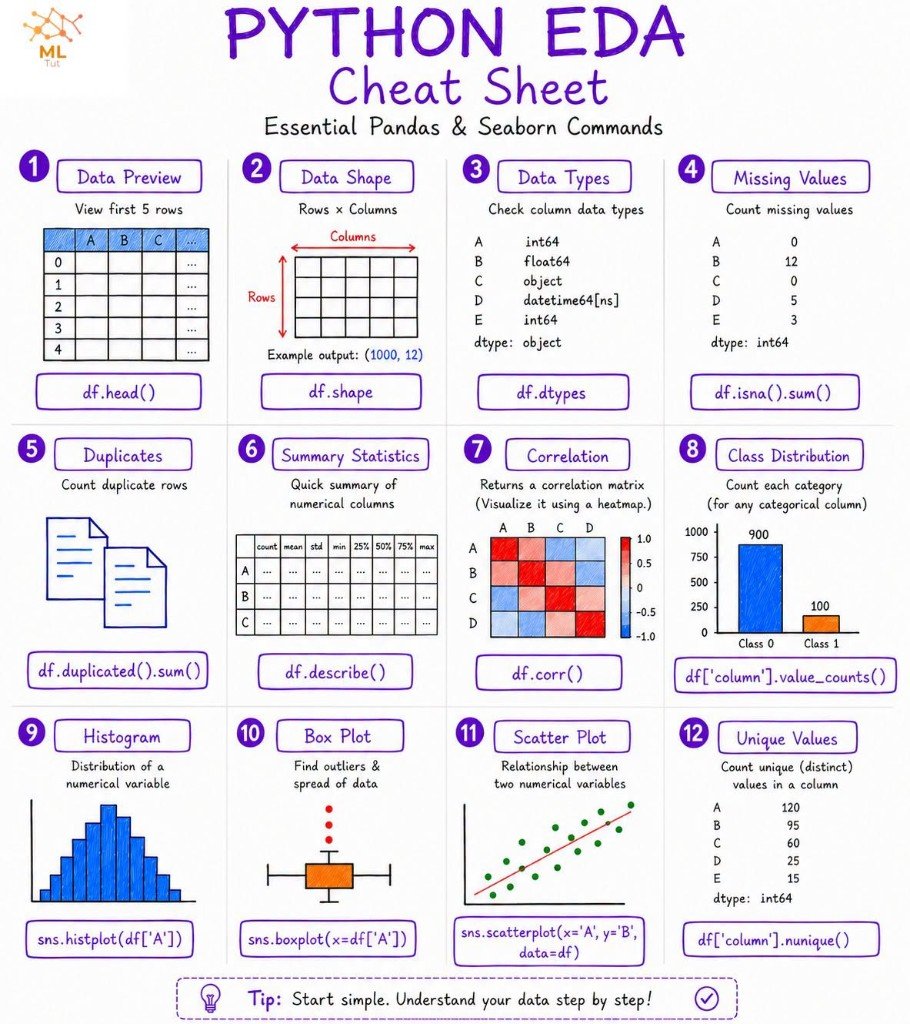
df.isna().sum()          # per column
df.isnull().sum()        # same as isna
df.notna().sum()
Breaking it down:
.isna().sum()— missing count per column.notna().sum()— non-missing counts
Use this when: a new export arrives and you need a missing-data report.
dropna
[dropna strategies]
WHY Drop rows when missing keys make the row useless.
WHEN Use subset= on key columns only.
df.dropna()                              # any NaN in row → drop row
df.dropna(subset=["customer_id"])        # only if key col missing
df.dropna(subset=["segment"], how="all")
df.dropna(axis=1, thresh=5)              # drop sparse columns
Breaking it down:
.dropna()— any NaN drops row.dropna(subset=['customer_id'])— only if key missing.dropna(axis=1, thresh=5)— drop sparse columns
Use this when: rows without customer_id can't join and should go.
Use when missing rows are unusable and few.
fillna
[fillna strategies]
WHY Fill with constant, median, or forward-fill depending on business rules.
WHEN Document the rule — stakeholders will ask.
df["monthly_spend"].fillna(0)
df["monthly_spend"].fillna(df["monthly_spend"].median())
df.fillna({"segment": "Unknown", "monthly_spend": 0})

# Categorical — most frequent value (mode); [0] picks first if there is a tie
df["segment"] = df["segment"].fillna(df["segment"].mode()[0])

df["monthly_spend"].fillna(method="ffill")   # deprecated style — prefer:
df["monthly_spend"].ffill()
df["monthly_spend"].bfill()
Breaking it down:
.fillna(0)or.fillna(median())— impute numeric.mode()[0]— fill categoricals with the most common existing label (keeps a real category;"Unknown"invents a new one).ffill()/.bfill()— carry last/next value
Do not write
df["col"].fillna(value, inplace=True). Selecting a column then usinginplace=Truetriggers a FutureWarning in modern pandas — it may not reliably change the original frame later. Assign back:df["col"] = df["col"].fillna(value), or usedf.fillna({"col": value})(same dict style as above — that form is also the safe fix for this warning).
Use this when: monthly_spend has gaps and you need a number for averaging.
| Strategy | When |
|---|---|
Constant 0 / "Unknown" | Business rule — new label when “missing” is meaningful |
| Mean / median | Numeric — median if outliers |
Mode (.mode()[0]) | Categorical — keep a real frequent category |
ffill / bfill | Time series order matters |
replace and interpolate
[replace and interpolate]
WHY replace turns bad codes into NaN; interpolate fills gaps along an ordered axis.
WHEN Use replace for sentinel values like 99 meaning unknown.
df["segment"].replace("", np.nan)
df["churned"].replace({0: 0, 1: 1, 99: np.nan})

df["monthly_spend"].interpolate(method="linear")   # ordered index helps
Breaking it down:
.replace('', np.nan)— empty string to missing.interpolate(method='linear')— fill between known points
Use this when: blank segments should be NaN or spend needs smooth fill on a time index.
Duplicates (related cleaning)
[duplicates cleanup]
WHY Duplicate customer_id rows inflate counts — drop or investigate.
WHEN Run after merge when keys might repeat.
df.duplicated(subset=["customer_id"]).sum()
df.drop_duplicates(subset=["customer_id"], keep="first")
Breaking it down:
.duplicated(subset=['customer_id']).sum()— count dupes.drop_duplicates(..., keep='first')— keep one
Use this when: CRM export accidentally has two rows for the same customer.
apply vs transform vs map
[transform map apply]
WHY transform keeps row count for group stats; map is lookup; apply is last resort.
WHEN Prefer transform over apply for group z-scores.
# transform — same shape as input, per group (preferred for fill/z-score)
df["revenue_z"] = df.groupby("segment")["total_revenue"].transform(
    lambda x: (x - x.mean()) / x.std()
)

# map — element-wise dict/Series lookup
tier = {"Gold": 3, "Silver": 2, "Bronze": 1, "Platinum": 4}
df["tier"] = df["segment"].map(tier)

# apply — row/column-wise; slower, use when vectorized won't work
df.apply(lambda row: row["total_revenue"] / max(row["total_orders"], 1), axis=1)
Breaking it down:
.groupby(...).transform(lambda x: ...)— z-score per segment.map(tier_dict)— segment to tier number.apply(..., axis=1)— row-wise when stuck
Use this when: each row needs a segment-level z-score without collapsing the table.
Mnemonic: transform = group stats back to every row; map = lookup table; apply = last resort.
Case study — compare mean vs median fill
[mean vs median fill case study]
WHY Mean pulls toward outliers; median is safer for skewed spend.
WHEN Compare both and write which you'd report.
import numpy as np

df = pd.read_csv("data/customers.csv")
df.loc[df.sample(5, random_state=1).index, "monthly_spend"] = np.nan

mean_fill = df["monthly_spend"].fillna(df["monthly_spend"].mean())
med_fill = df["monthly_spend"].fillna(df["monthly_spend"].median())

mean_fill.mean(), med_fill.mean()
Breaking it down:
- Inject NaN with
.loc[sample(...)] - Compare
.mean()after mean-fill vs median-fill
Use this when: choosing imputation for monthly_spend with a few huge outliers.
Document which you would report to stakeholders and why.
Pandas data cleaning command reference (ds5–ds8)
Use with basics, analysis, merge.
| Category | API |
|---|---|
| Missing | isna, notna, dropna, fillna, ffill, bfill, interpolate |
| Replace | replace, clip |
| Duplicates | duplicated, drop_duplicates |
| Group | groupby.transform, map, apply |
| Export | to_csv(..., index=False) |
Full pandas path checklist — tick before EDA:
- [ ]
read_csv+info+describe - [ ] Filter (
loc,query,isin) - [ ]
sort_values/nlargest - [ ]
groupby.agg/pivot_table - [ ]
merge+ row count check - [ ]
isna+fillnaordropnawith written rule - [ ]
to_csvexport
Essential commands
| Command / action | What it does |
|---|---|
df.isna() / df.notna() | Detect missing values. |
df.dropna(subset=[cols]) | Remove incomplete rows. |
df.fillna(value) / .ffill() / .bfill() | Impute or forward-fill. |
df.interpolate() | Fill gaps along an axis. |
df.replace(...) | Swap values including → NaN. |
drop_duplicates | Remove duplicate keys. |
.transform(func) | Per-group calc, same row count. |
.map(dict) | Lookup-style recode. |
Practice
Do this now: Notebook ds08_missing.ipynb — introduce 5 NaN; write 2-sentence imputation policy; compare mean vs median fill; one transform z-score by segment.
Checklist
- [ ]
isna().sum()per column - [ ] fill or drop justified in writing
- [ ]
transformused (not rowapplyunless needed) - [ ] Pandas ds5–ds8 checklist reviewed
- [ ] Ready for EDA
Close the wrangling loop: data-quality risks on a real ranking — Cross-skill project brief (Python path; Excel/SQL also valid). Not the BA strategy capstone.