Introduction to DBMS
Lesson opener
In one line: Tables, keys, schemas - how business data maps to relational databases.
Why it matters: Without a picture of how tables connect, you guess which column links what - and your joins return garbage or duplicate rows.
Before this lesson: AI Prompting capstone
Before you start
| Resource | Link |
|---|---|
| Previous | AI Prompting capstone |
| Next | SQL commands & basics |
What you will learn
Tables, keys, schemas — how business data maps to relational databases.
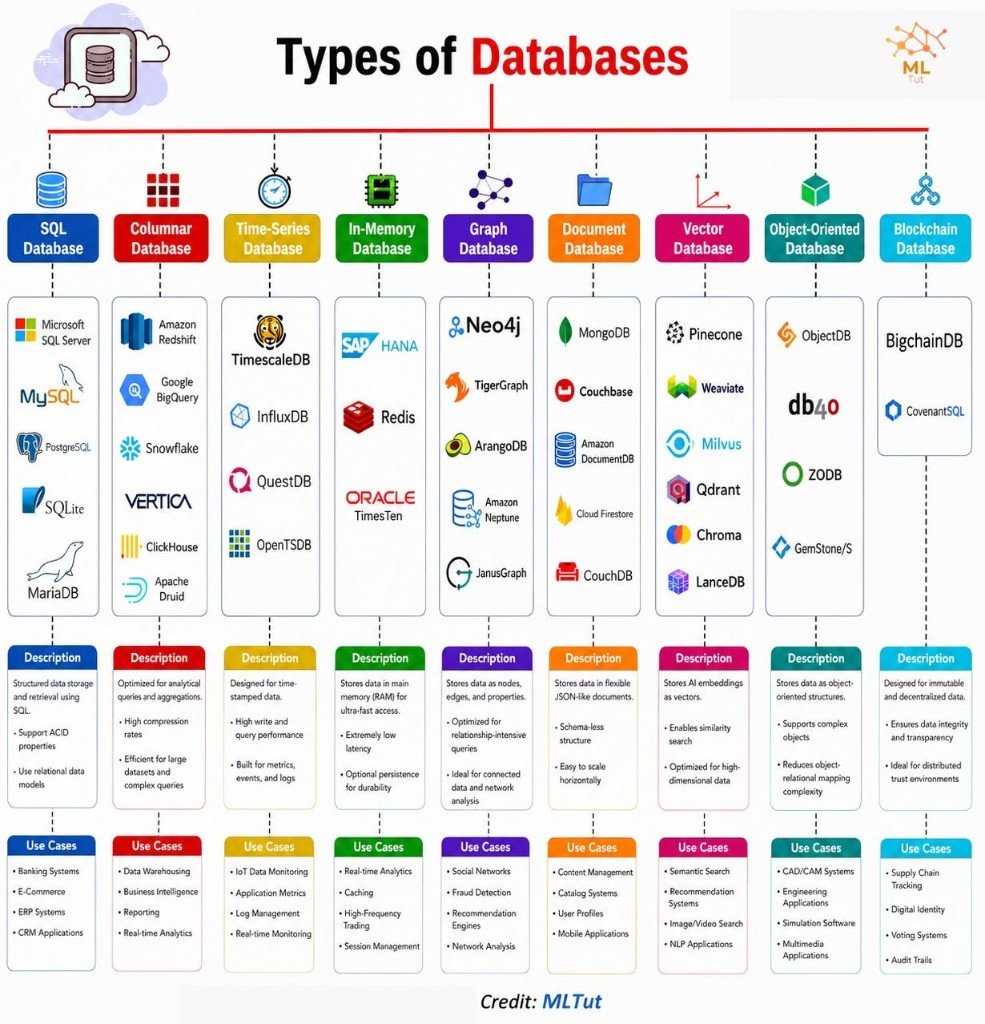
This course focuses on SQL (relational) databases — the type behind most business ERP, CRM, and reporting systems.
SQLite = single-file, no server — fine for local demos and prototyping, not what enterprise/ERP teams run in production (that's MySQL, Postgres, SQL Server, Oracle).
Concepts
| Term | Meaning | Lab example |
|---|---|---|
| Database | Container | learnings_lab |
| Table | Rows + columns | customers, sales |
| Primary key | Unique row id | customer_id |
| Foreign key | Link to other table | sales.customer_id → customers |
| Schema | Structure definition | column types |
| VIEW | Saved query with a name (looks like a table) | See CTE & Views |
Primary keys and foreign keys — in depth
Primary key (PK): One column (or a small combo) that uniquely identifies each row in a table. No duplicates, no NULLs in a well-designed key.
| Table | PK | Why it works |
|---|---|---|
customers | customer_id | One ID per person — C001 never appears twice |
sales | order_id | One ID per order line |
Foreign key (FK): A column in the child table that points to the parent's PK. It enforces the link: "this order belongs to that customer."
sales.customer_id  →  customers.customer_id
     (FK)                    (PK)
What goes wrong without keys:
| Problem | Symptom |
|---|---|
| Duplicate PK | Two customers share C001 — revenue double-counts |
| Orphan FK | sales row references C999 but no such customer — join drops or shows NULL |
| Missing FK | You join on segment name instead of ID — "Gold" typos break matches |
Try it in Workbench: DESCRIBE customers; — look for PRI in the Key column on customer_id.
ETL — how data gets into the database
ETL = Extract (pull from source) → Transform (clean, type, dedupe) → Load (write to tables). Excel Power Query and SQL imports both follow this pattern.
Tutorial — ER diagram (text)
[Customer–sales relationship diagram]
WHY: Without a picture of how tables connect, you guess which column links what — and your joins return garbage or duplicate rows.
WHEN: You're onboarding to a new dataset and need to explain "one customer, many orders" to a teammate before writing any SQL.
customers (1) ──< sales (many)Breaking it down:
customers (1)→ one row per customer (the "parent" side)──<→ "has many" — the crow's foot points at the child tablesales (many)→ many order rows can point back to the same customer
Use this when: You're sketching the data model on a whiteboard before building a revenue-by-customer report.
Tutorial — Explore in Workbench
[First look at a table]
WHY: Jumping straight into complex queries on a table you haven't seen yet means wrong column names, surprise data types, and accidental full-table scans.
WHEN: You just got access to learnings_lab and want a quick sanity check before the standup.
USE learnings_lab;
DESCRIBE customers;
SELECT * FROM customers LIMIT 5;
Breaking it down:
USE learnings_lab→ tell MySQL which database [container] to work inDESCRIBE customers→ show column names, types, and keys — like peeking at the header rowSELECT * FROM customers→ pull every column from every rowLIMIT 5→ cap at five rows so you don't flood Workbench
Use this when: Someone hands you a new table name and you need to know what's inside before writing filters or joins.
Compare Excel vs database
Filter, sort, group, join — the same job in three tools:

| Excel | MySQL |
|---|---|
| Sheet | Table |
| VLOOKUP | JOIN |
| Pivot | GROUP BY |
| Save file | Persistent DB + queries |
Install DB: MySQL setup.
Essential commands
| Command / action | What it does |
|---|---|
USE database_name; | Select which database to query. |
DESCRIBE table_name; | Show table structure. |
SHOW TABLES; | List tables in current database. |
SELECT * FROM t LIMIT n; | Safe preview of table contents. |
Practice
Before each query, name the three SQL beats — Source → Pattern → Result (SQL translation of Input → Logic → Output — see sql2). Exploration queries still use the habit: name the table as Source, the command pattern, and what shape you expect back.
Do this now:
- Run
DESCRIBE+SELECT … LIMIToncustomers(worked model below). - Repeat the same habit on
sales. - Draw both tables on paper and label PK / FK.
- Save notes / snippets as you explore (optional script name:
01_intro.sql).
Example framing for task 1:
-- Source: customers (all columns — exploring structure)
-- Pattern: DESCRIBE + SELECT with LIMIT
-- Result: column list / keys, then 5 sample rows (not a full dump)

USE learnings_lab;
DESCRIBE customers;
SELECT * FROM customers LIMIT 5;
Framing prompts for the rest (fill these blanks before each step):
- Source: ___
Pattern: ___
Result: ___
- Source: ___
Pattern: ___
Result: ___
Where This Connects
Scale-up: Once one OLTP database isn't enough for analytics at volume, teams land data in a cloud warehouse (e.g. BigQuery, Snowflake, Redshift) and often model transforms with dbt. Awareness only; not taught on this site.
Cross-ecosystem: Same filter / aggregate / join job on this site (trio diagram above): Spreadsheets intro and Pandas basics. Dialect deepening: PostgreSQL after this MySQL track.
Checklist
- [ ] I can name PK and FK
- [ ] Both tables described
- [ ] Next: SQL commands