Python & SQL — Query MySQL from Pandas
Lesson opener
In one line: Connect Python to MySQL with PyMySQL and SQLAlchemy.
Why it matters: This shows up at work when you need to connect Python to MySQL with PyMySQL and SQLAlchemy.
Before this lesson: SQL joins / Pandas basics / MySQL install
Before you start
| Resource | Link |
|---|---|
| Previous | Web scraping |
| Next | NumPy basics |
| Prerequisites | SQL joins, Pandas basics, MySQL install |
| Time | ~60 minutes |
| What you need | Local MySQL (or cloud instance), pip install pandas pymysql sqlalchemy |
What you will learn
- Connect Python to MySQL with PyMySQL and SQLAlchemy
- Run queries into a DataFrame with
pandas.read_sql() - Write results back with
DataFrame.to_sql() - The daily workflow analysts actually use: SQL for extraction, pandas for transformation
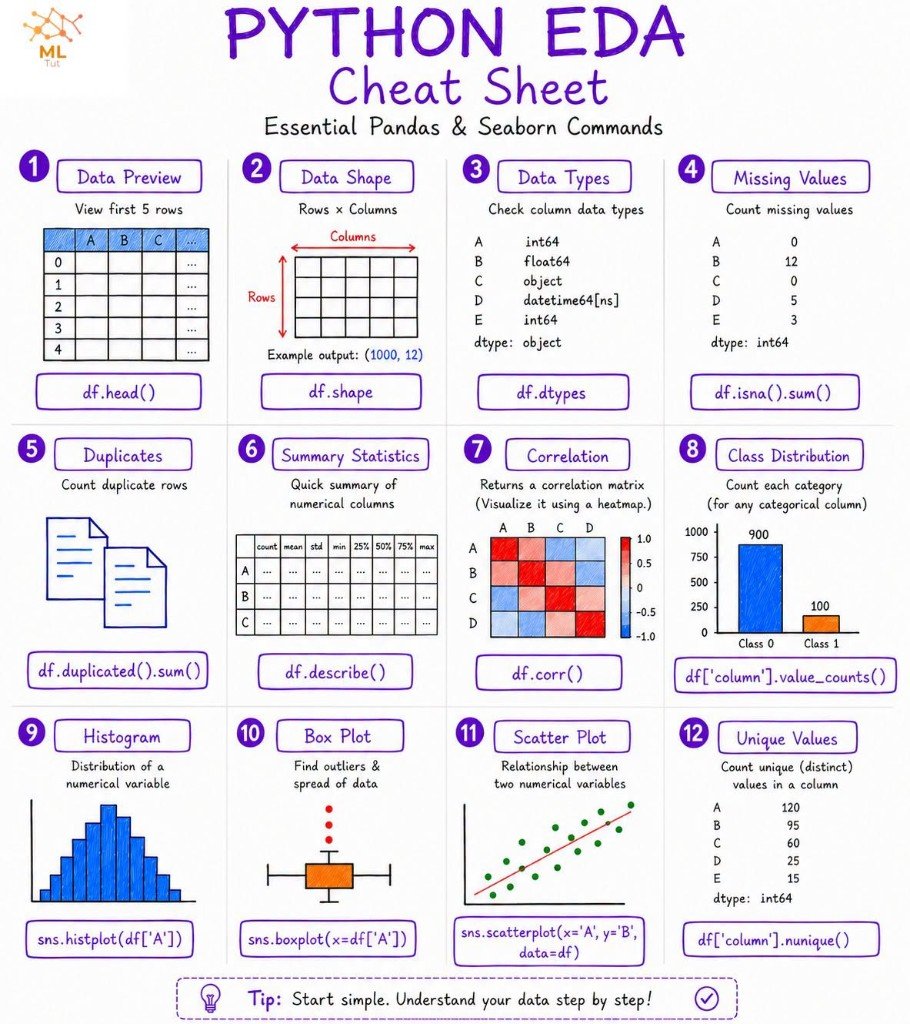
This is the bridge between your SQL track and pandas track. Rana uses this pattern every week at work.
Section 1 — Why Python + SQL together
Plain English:
SQL is brilliant at filtering and joining millions of rows inside the database. Pandas is brilliant at cleaning, exploring, and modelling in a notebook. Neither replaces the other.
| Task | Best tool |
|---|---|
| Join 5 tables on 2M rows | SQL |
| Handle missing values, plot distributions | pandas |
| Aggregate by region for dashboard | SQL or pandas (your choice) |
| Train a model, export scores | pandas + sklearn |
| Persist cleaned table for BI team | to_sql() back to MySQL |
Real workplace example (Bangalore analytics team):
Morning: read_sql pulls yesterday's orders from sales_db. Afternoon: clean and segment in pandas. Evening: to_sql writes customer_segments table for the Power BI dashboard.
Section 2 — Connect with PyMySQL
pip install pymysql pandas sqlalchemyRaw connection (good for learning)
import pymysql

conn = pymysql.connect(
    host="localhost",
    user="root",
    password="your_password",
    database="sales_db",
    charset="utf8mb4",
)

cursor = conn.cursor()
cursor.execute("SELECT COUNT(*) FROM customers")
print(cursor.fetchone())  # (300,)
conn.close()
Security: Never commit passwords to git. Use environment variables:
import os
password = os.environ.get("MYSQL_PASSWORD", "")
Section 3 — SQLAlchemy engine (recommended)
[SQLAlchemy create_engine]
WHY One engine object works with read_sql, to_sql, and pandas across your notebook.
WHEN Any repeatable analytics script.
from sqlalchemy import create_engine, text
import pandas as pd

engine = create_engine(
    "mysql+pymysql://root:your_password@localhost:3306/sales_db",
    echo=False,  # set True to print SQL
)

# Test connection
with engine.connect() as conn:
    result = conn.execute(text("SELECT 1"))
    print(result.fetchone())
Connection string format:
mysql+pymysql://USER:PASSWORD@HOST:PORT/DATABASESection 4 — read_sql into a DataFrame
[pandas read_sql]
WHY Replace manual CSV exports from Workbench with one line in your notebook.
WHEN Daily refresh of sales, customers, or inventory.
import pandas as pd
from sqlalchemy import create_engine

engine = create_engine("mysql+pymysql://root:pass@localhost/sales_db")

query = """
SELECT
    c.customer_id,
    c.segment,
    c.region,
    SUM(s.revenue) AS total_revenue,
    COUNT(s.order_id) AS order_count
FROM customers c
JOIN sales s ON c.customer_id = s.customer_id
WHERE s.order_date >= '2025-01-01'
GROUP BY c.customer_id, c.segment, c.region
"""

df = pd.read_sql(query, engine)
print(df.shape)
df.head()
Parameterised queries (prevent SQL injection)
from sqlalchemy import text

sql = text("""
    SELECT * FROM sales
    WHERE region = :region AND revenue > :min_rev
""")

df = pd.read_sql(
    sql,
    engine,
    params={"region": "West", "min_rev": 1000},
)
Breaking it down:
pd.read_sql(sql, engine)— runs query, returns DataFrame- Use
text()+:nameplaceholders — never f-string user input into SQL
Read an entire table
customers = pd.read_sql_table("customers", engine)Use this when: the table is small and you need every column.
Section 5 — Transform in pandas, write back with to_sql
[DataFrame to_sql]
WHY Persist cleaned or scored data so BI tools and other teams can query it.
WHEN After segmentation, churn scores, or data quality fixes.
# After analysis in pandas
segments = (
    df.groupby("customer_id", as_index=False)
    .agg(total_revenue=("total_revenue", "sum"))
)
segments["tier"] = pd.cut(
    segments["total_revenue"],
    bins=[0, 5000, 20000, float("inf")],
    labels=["Bronze", "Silver", "Gold"],
)

segments.to_sql(
    name="customer_segments",
    con=engine,
    if_exists="replace",  # "append", "fail"
    index=False,
)
print("Wrote", len(segments), "rows to customer_segments")
if_exists | Behaviour |
|---|---|
"fail" | Error if table exists (safest default) |
"replace" | Drop and recreate table |
"append" | Add rows to existing table |
replacedrops the old table. Confirm with stakeholders before overwriting production tables. In production, often write tocustomer_segments_stagingfirst.
Section 6 — End-to-end workflow
from sqlalchemy import create_engine, text
import pandas as pd

engine = create_engine("mysql+pymysql://root:pass@localhost/sales_db")

# 1. Extract
raw = pd.read_sql("""
    SELECT c.*, s.revenue, s.order_date
    FROM customers c
    LEFT JOIN sales s ON c.customer_id = s.customer_id
""", engine)

# 2. Transform
raw["order_date"] = pd.to_datetime(raw["order_date"])
summary = (
    raw.groupby(["region", "segment"], as_index=False)
    .agg(customers=("customer_id", "nunique"), revenue=("revenue", "sum"))
)

# 3. Load
summary.to_sql("region_summary", engine, if_exists="replace", index=False)
This is ETL in 15 lines: Extract (SQL) → Transform (pandas) → Load (to_sql).
Section 7 — Common mistakes
Mistake 1 — Loading huge tables into memory
# WRONG for 50M rows:
df = pd.read_sql("SELECT * FROM events", engine)

# RIGHT — filter in SQL:
df = pd.read_sql(
    "SELECT * FROM events WHERE event_date >= '2026-01-01'",
    engine,
)
Mistake 2 — String interpolation with user input
# WRONG — SQL injection risk:
region = request.get("region")
df = pd.read_sql(f"SELECT * FROM sales WHERE region = '{region}'", engine)

# RIGHT — parameters:
df = pd.read_sql(
    text("SELECT * FROM sales WHERE region = :r"),
    engine,
    params={"r": region},
)
Mistake 3 — Forgetting to close connections
With SQLAlchemy engine, connections are pooled — with engine.connect() handles cleanup. Avoid leaving raw pymysql connections open in loops.
Practice
- Connect to your local
sales_db(or sample DB from setup2). read_sqla join of customers + sales; compute revenue by region in pandas.to_sqlthe summary to a new tablepractice_region_summary.
Checklist
Before moving to Web scraping, confirm:
- [ ] Can you create a SQLAlchemy engine for MySQL?
- [ ] Can you load query results with
pd.read_sql()? - [ ] Do you know why parameterised queries matter?
- [ ] Can you write a DataFrame back with
to_sql()and explainif_exists? - [ ] Can you sketch an Extract → Transform → Load pipeline?
Interview Prep — Skill Mastery Challenge
Before you attempt these questions:
- Review the lesson material above
- Try to answer verbally first
- Then reveal the answer
Filter in SQL when you can reduce rows before they hit Python — less memory, faster. Filter in pandas when logic is awkward in SQL, you already have a small DataFrame, or you need iterative exploration.
Inserts new rows into an existing table without dropping it. Use for incremental daily loads. Contrast with replace (drop and recreate) and fail (error if table exists).
What's next
NumPy basics — start Data Analysis with Python with arrays and vectorised math.